Welcome to the game! Dust: Fire and Ice is a fast paced puzzle-platformer game that challenges players to beat the rising flood to the top! Players collect coins and items and avoid enemies as trailblazing a path using their two special powers: fire and ice.
Want to jump right in? Hold on, Dust is a game of skill. First we're going to run down how to get a game going and how to play so you can escape the rising tide!
¶ Contents
- Coins
- The Heart
- The Door
- Blocks
- Sticky Blocks
- Block Spawner
- Recharge Station
- Trampolines
- Moving Platforms
- Water Drips
- Locked Door and Key
¶ How to Start a Game
Fire up Dust! The first thing you'll see is the main menu.

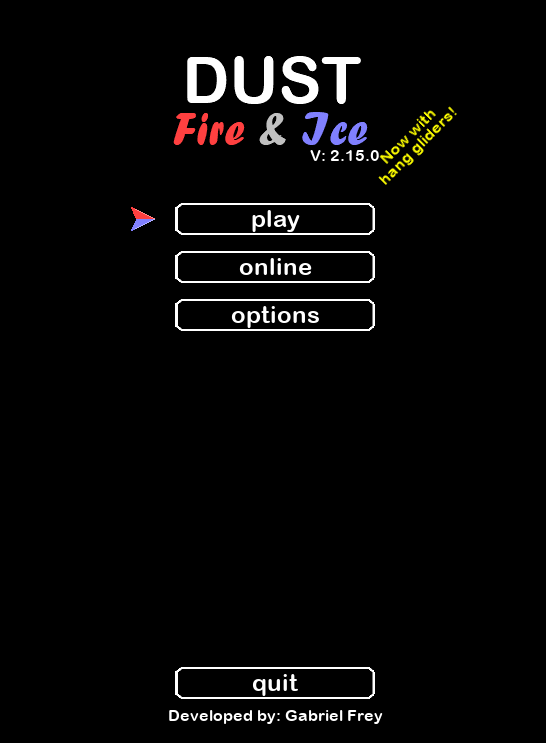
Here you have 3 options:
- Play - Starts a single computer game (multiple people are allowed are one computer)
- Online - Starts an online game so you can play with your friends!
- Options - Allows you to change controls, game options, and more
To move around on the menus, you can either click directly on buttons or move the selector up and down with 'W' and 'S' or left and right with 'A' and 'D'. To start out you'll want to click Play. That will bring you to a screen inviting other players to join.

You can also change your character or the team you'll be on. Change your character with left or right and your team with up and down. These are the default controls for those buttons. They can be changed any time under the Main Menu>Options>Controls
| Control Method | Left | Right | Up | Down |
|---|---|---|---|---|
| Keyboard and mouse | A | D | W | S |
| Keyboard only | Left arrow | Right arrow | Up arrow | Down arrow |
| Controller | Left joystick: left | Left joystick: right | Left joystick: up | Left joystick: down |
Players on the same team can help each other out. They also share lives and score. Once you're done picking your character and team click the play button in the bottom right or hit enter. You'll be brought to a list of levels. If this is your first time they'll just be one called "First", but you can create more with the "New" button in the bottom middle. All levels are randomly generated in Dust: Fire and Ice so who knows what you'll get! For now, just click play.

Congratulations, you've started your first game! Quick now, the rain will be falling soon. Wait you don't know what to do? If only you knew...
¶ Basic Moving
We think it's easiest to play this game with a mouse and keyboard, and recommend you start with that if you're just learning. A controller or just the keyboard or viable too, we'll just be giving the default keys for the mouse and keyboard in this tutorial.
Before you start, you might want to turn the water off so you don't die while you're learning. To do this go to the main menu (Hit 'R' if you're already in a game to restart) then go to options>game options> and set the water option to off by using up (W) or down (S) to navigate to the option then left (A) or right (D) to turn it off. Good, now you won't drown while you're figuring things out. You can also change the difficulty to Beginner so a few more platforms spawn in each level, that will make things easier.
Moving is easy. Press left (A) and right (D) to move left and right and up (W) to jump. Tapping jump will give you a small hop, while holding down on up (for up to about half a second) will give you a larger jump. That's it! You can press left and right in air to slow yourself down during a jump as well to make it easier to land on a platform. Note, you cannot change directions in mid-air, so make sure you know where you're going before you jump!
One more important thing: climbing, if you're hanging on a ledge like this:

because you couldn't quite jump on top of it, you can press up again to climb the ledge! Now you're going places.
¶ Basic Abilities
¶ Fire and Ice
That was fun for a little bit but now you want to do stuff. No fear, there's lots to do. Most of the things you do require just two buttons: the left action or ice and the right action or fire. If you're not near anything the left action (left mouse click) will shoot a ball of ice that freezes things and the right action (right mouse click) will shoot a ball of fire that melts things or burns enemies. Aim the fire and ice with your mouse, but be careful! Each shot takes 5 energy points and you only have ~100!

If you're touching a block you can use left action to pick the block up (Make sure you're facing towards it!). Your character will carry it with them, but will have to crouch down some because it's heavy. Left action again will throw the block wherever your mouse is pointing. You can gently set down a block by pointing the mouse directly below the player. You can also use the down key (S) to pick up a block or item directly beneath your character.

¶ Timed Abilities
Now are two very important abilities which can be a little trick at first: delayed freezing and explosion. The idea is simple. First grab a block by pressing left action (left mouse click), then hold down on the left action until a timer appears above the block. It will count down 3...2...1... You have until the timer runs out to throw the block. When the timer hits 0, the block will freeze in place wherever it is at. Timing it to freeze above you is an important skill so you can climb upward!

The same can be done with the right action or fire key. Grab a block, use the right action (right mouse click), you can just press it once for this, you don't have to hold down. Again a timer will start 3...2...1... and you have those 3 seconds to throw the block. Once it reaches 0 the block will freeze and turn red. You now have three more seconds to get out of the way because once it hits 0 it will explode and destroy everything in its radius, knocking down platforms! Be careful though, if a platform lands on you it will kill you instantly.
A couple notes on "exploding blocks" (or corpses). The explosion is the equivalent of shooting a bunch of fireballs everywhere in its radius so it can serve other purposes than knocking down block platforms. For example, an explosion can kill bad guys or put a moving platform up to full speed. If you're really in a rush and need can't wait the extra 3 seconds for the block to explode (because you're about to drown) you can shoot a fireball at the red block and it will explode instantly. Just make sure you're not under any block platforms that could fall on you!

By freezing blocks, burning enemies, and occasionally blowing things up you can make it to the top!
¶ Advanced Moving
There a few secrets that make the game a little easier if you think you're ready for them.
¶ Down Key
First is the down key (S) that has gone unused until now. Holding down on the down key will allow you to travel slowly should you need to move precisely for some reason. The down key also has another purpose. If you go to the edge of a block or platform and press the down key, the player will go into hanging mode on the edge. From there you can use either the up key to climb back up or the down key to drop off the edge to (hopefully) a platform below. Finally the down key also allows you to NOT jump on a trampoline when you're falling towards it, if you want to get something beneath it for example.
¶ Climbing Down
Here's another hint you'll soon find useful: Maybe you are trying to grab on a platform but are worried because there is a block or item right on the edge.

Well don't worry! As long as you reach the top edge of the platform your character will still grab on. You can then press the jump key to climb up, pushing the block or item out of the way as you do so.

¶ Wall Jumps
One more thing, my favorite advanced movement technique: wall jumping. Wall jumping is a little tricky but can be very useful and is very fun. To perform a wall jump, run towards a wall at full speed, holding down on the right action button (right click). Just before you hit the wall, jump, and you'll find you bounce off of it with a little vertical boost!

You can perform multiple jumps if the walls are close together, but this is trickier. Remember that once you hit the wall, you will be traveling the opposite direction, but you will probably still be holding down on the direction towards the wall you hit. That will slow you down and make the next jump impossible. To get two, three, or more jumps you need to quickly switch directions as soon as you hit the wall to keep the speed up. Remember: your character must be traveling near full speed and holding down on the right action to perform a wall jump.
¶ Player Throwing
Here's a fun thing you can do with your teammates. Go up to them and press and the left action (left click) and you will grab them like a block and can throw them! Sometimes this can be helpful if you need to get someone up to the next platform so they can throw you down a block or item to get up.

Note you can't pick up people of other teams, and both you and the other player can't be holding any items or blocks. If you get picked up by a teammate accidentally (or on purpose) and want to get down, just press the down key and you'll fall down.
Now you're ready to really crush some levels and maybe even avoid drowning to death!
¶ Game Features
You've probably noticed a few things in the pictures: coins, platforms, trampolines, etc.. These are the game features that will help you increase your score and survive!
¶ Coins
These are your gold! Collect as many as you can on the way up, but don't get too greedy! Extra coins won't matter much if you drown.

¶ The Heart
This is your 1-up. There is only one per level, regardless of how many players are playing so be quick if you want it! Not only will it give you (or your team) an extra life, it will fully heal the player that collects it! This will also only appear the first time you play a level, if you lose the level and have to restart, no extra heart.

¶ The Door
This is the finish! Each level has a door somewhere at the top. Once you enter that door you're safe. So long as someone playing has passed through the door, everyone will advance to the next level. There is also a score bonus for being the first through the door!

¶ Blocks
These are the basic blocks you throw around, freeze, jump off of, and detonate. Like the larger game platforms, your character can climb them. You can push these blocks around and burn them should the need be by shooting fireballs at it with right action (right mouse click).

¶ Sticky Blocks
The "upgraded" block! You get 4 of them on the bottom floor of each level. These blocks can be thrown against walls and will stick to them, no freezing necessary (although at least half the block must be touching the wall or it won't stick). Very convenient for when you run out of energy.

¶ Block Spawner
Out of blocks? No worry! The block spawner will soon warp in a new one from a parallel universe! There are spawners for normal blocks and spawners for sticky blocks, including 4 at the bottom of each level. The only downside is it takes some time and the water isn't going to wait. Just make sure you keep the space above the spawner free or you won't get a new block!

¶ Recharge Station
Out of energy? Your other friend on the platform is the blue recharge station which will replenish your energy quickly just by standing in it! It's that easy.

¶ Trampolines
Arguably the best game feature. These are pretty straightforward, jump on the trampoline and you'll go higher! If you don't want to jump, you can hold down on the down key and you'll fall beneath the trampoline. This doesn't work with a hang-glider however, just fall slowly down with one of those to pass through the trampoline.

You can also drag a trampoline by using the left action (left click) while underneath the trampoline. But beware! If you drag a trampoline too far off an edge it'll topple off! No worries though, you can push them back upright by running towards the springy side of the trampoline (not the legs) and jumping to kick the trampoline back over.

¶ Moving Platforms
These platforms are still to start out, but will move if you motivate them! Shoot a fireball at a platform to make it go back and forth (or up and down depending on the arrows). You can shoot the platform up to 3 times to make it go further! You can also shoot iceballs to slow them back down again.

¶ Water Drips
If you haven't noticed yet Dust characters have an aversion to water. The water drops coming from these will hurt you if you hit them. Fortunately, you can use an iceball (left action) to freeze them into a block and jump on them. If you unfreeze them with a fireball (right action) they will turn back into water drops.

You can also freeze the source if you're tired of dealing with it!

¶ Enemies
There are currently two enemies the vicious patrol and the sharp-shooting sentry.
The patrol walks back and forth on a platform, guarding it. Every time you pass the patrol he slaps you in the face (or makes a mean spirited remark) and you lose 10 health. You have ~100 health to start (depending on your character).

The sentry is a stationary guard that shoots laser beams one direction. The goal of course is to avoid having laser holes in your character at the end of the level.

There is one more enemy I forgot about. The piranha! This enemy is actually spawned when another player dies (if there are multiple players). The piranhas can swim around with left and right and swim up or jump out of the water with the jump button. The piranha bites players it touches so stay away!

¶ Locked Door and Key
This is an optional game feature to make things a little more interesting (and difficult!). To turn it on, go to the main menu then options> game options> locked door> and turn it on. This feature will put a lock over the purple finish door like this:

The door will not open until you collect the key, which will spawn somewhere on the map, surrounded in a cage like this:

You'll have to use an explosive block (read about it in Basic Abilities) to get the key. Simply collide with the key to collect it and the door will unlock! Freedom awaits!
¶ Items
Jumping and freezing blocks alone is nice, but it won't be enough to get you through most levels. Fortunately there is help: items that are located across the map that help the player get around or serve some other purpose. Here they are!
¶ Guns
The gun can be equipped with the right action (right mouse click) or grabbed to be thrown like a block with the left action (left mouse click). Once equipped it allows you to shoot fireballs and iceballs in an infinite line without arc! Fireballs also do twice the damage to enemies! This can be handy for killing that patrol across the map or triggering a far away platform.

¶ Climbing Picks
The climbing pick is a very useful item that allows your character to scale walls. Like the gun, you can equip it using the right action or pick it up to throw to a teammate using the left action.

Once you've equipped it, simply jump against the side of any wall you want to climb and you'll find you stick to it! You can then use right action (fire) to go up or left action (ice) to go down. Use it carefully though because climbing up and down takes energy!

¶ Hang Gliders
The graceful hang glider allows you to softly float through the air. With this item you can cover great horizontal distances if you have a little height to take off from. All you have to do is grab the hang glider with left action (left click) like you're grabbing a block. Just hold onto it and you can float! You can also change directions in mid-air with a hang-glider which can be very useful. Sometimes you'll want to touch ground again, just hold the down key (S) to open the glider and fall down!

¶ Jetpacks
A rare and extremely good item for a platformer -- a jetpack! With this item you can soar straight up to the finish! Well, it's not quite that simple, the jetpack requires a lot of energy. To use it, grab it like a block with left action (left click) and hold down on right action (right click) to fly! Note: using the fire action will automatically make you jump as high as you can before starting to use fuel, so you don't have to worry about giving yourself a little extra boost to save energy! The correct way to use the jetpack is to hold down on the fire action.

Just one thing, watch out for water! If the jetpack goes underwater or get hits by a water droplet from a water dripper, it will break and not be useable anymore.
